IMAGINE IT.
BUILD IT.
PLAY IT.

Your next effect starts with an idea.

The open-source ForgeEFX Blocks SDK lets you build your own pedal clones and original effects. Recreate a favourite pedal with AI assistance, write the DSP yourself, or combine both approaches. DL-1 Paid can load and use your finished custom blocks alongside the included effects.

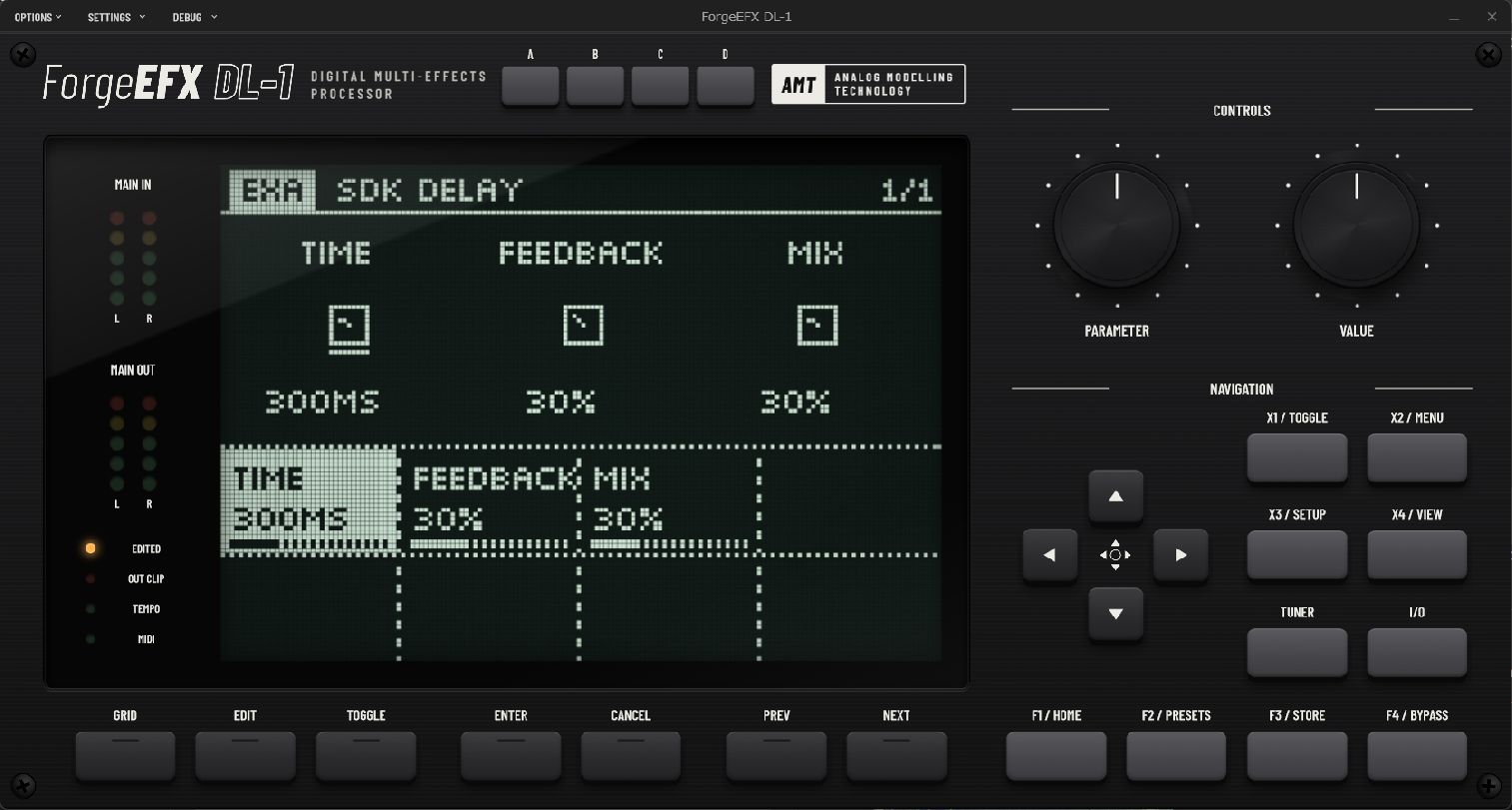
The SDK Delay block running in DL-1 with the dark LCD theme, showing Time, Feedback and Mix controls
AN IDEA, RUNNING IN THE RACK.The included delay example, with its own controls and custom editor. Actual DL-1 screenshot.Explore the delay example

SMALL BLOCK.
YOUR WHOLE IDEA.

A block brings its sound, parameters and optional editor together in one .fxblock package. DL-1 handles routing and saved parameter values, so you can concentrate on what makes the effect yours.

Read the architecture
dsp.cTHE SOUND
Your audio processing: the drive character, the movement, the way a repeat falls apart.
parameters.jsonTHE CONTROLS
Define parameter names, ranges and defaults. Decide what a player can reach for.
ui.c (optional)THE FEEL
Draw a custom editor using the host's drawing services, or use the default editor and get straight to the sound.

DESCRIBE THE SOUND.
BUILD WITH AN AGENT.

The SDK is preconfigured for LLM coding agents. Open the repository in your preferred coding agent and tell it which pedal or sound you want to recreate. Prefer to write every line yourself? The same SDK, examples and tools work with your own C/C++ workflow.

Its AGENTS.md points the agent to the development guide, SDK reference and parameter schema. Working examples, a CMake package generator and a compiled-module validator give it a practical starting point for building and checking your effect.

  1. GIVE IT A MUSICAL BRIEF.

    Name the character, controls and behaviour you want. A pedal-inspired overdrive? A delay that frays as notes decay? Start there.

  2. BUILD. VALIDATE. LOAD.

    Have your agent implement the block, build the package and run the checks. Copy the complete .fxblock folder into the Blocks folder configured in DL-1 Paid, then restart the host and add your effect to the signal chain.

  3. PLAY IT INTO SHAPE.

    Listen, adjust the brief and iterate. Tests check the implementation; your ears decide whether it has the feel you imagined.

You will need CMake, Python and a C/C++ compiler. Build separately for each target platform. The getting-started guide walks through setup.

THREE PEDALS.
JUST ADD AN IDEA.

Three fictional pedals to imagine with your coding agent. Each prompt pairs a musical brief with the result to aim for. Build, listen and refine it into your own sound.

ORBIT ECHO

A warm delay that wanders out of tune.

ASK AI

Read AGENTS.md and Development Guide.md. Build a fictional delay pedal called Orbit Echo as a DL-1 block. Make each repeat darker, with gentle pitch drift like a worn tape machine. Give it Time, Feedback, Drift, Tone and Mix controls. Keep the dry signal clear and the feedback bounded. Build and validate the .fxblock package, then explain how to load it into DL-1.

WHAT TO EXPECT

A playable delay block with five controls. Short settings add a soft, wobbly slapback; longer settings leave a trail of darkening echoes. Turning up Drift makes the repeats sway further in pitch while your original note stays steady.

VELVET VOLT

A touch-sensitive fuzz with a ragged edge.

ASK AI

Read AGENTS.md and Development Guide.md. Build a fictional fuzz pedal called Velvet Volt as a DL-1 block. Soft picking should give a grainy crunch; hard picking should push into thick fuzz. Add a Gate control that can make note tails sputter and cut short. Give it Fuzz, Gate, Tone and Level controls, with a low-gate default that lets notes sustain. Build and validate the .fxblock package, then explain how to load it into DL-1.

WHAT TO EXPECT

A four-control fuzz block that responds to your picking strength. Low Gate settings aim for thick, sustained leads; higher settings turn decaying notes into short, broken textures. Tone shapes the bite, and Level lets you match the bypassed volume.

CLOUD LOOM

A reverb that blooms behind your playing.

ASK AI

Read AGENTS.md and Development Guide.md. Build a fictional ambient reverb pedal called Cloud Loom as a DL-1 block. Let the wet sound swell in gradually after each note, with a dark, gently modulated tail. Preserve the dry attack. Give it Bloom, Decay, Motion, Tone and Mix controls. Start with a subtle default that keeps chords clear. Build and validate the .fxblock package, then explain how to load it into DL-1.

WHAT TO EXPECT

A five-control reverb block with a clear pick attack and a slowly rising wash behind it. Longer Bloom and Decay settings turn spaced-out chords into lingering pads; Motion adds a gentle shimmer of pitch movement, and Mix brings the ambience forward.

THE NEXT SOUND IS YOURS.

Explore the source, start from an example, and see where the idea takes you.